No credit card. 2-minute setup.Web, iOS — Android coming.
"Add Anna tomorrow at 3 PM, manicure."Kali is listening…
A
Anna · Manicure15:00 · €40
Net €1 572 this month↑ 18%
app.ccustom.ai/bookSent. Anna will get app.ccustom.ai/book in her language.
72voice commands
16record types
17automations
43Languages
Built forNailsBrowsLashesHairBarberMassagePodologyDentalTattooBeautySpaFitnessCoachesTutorsPet careTherapyAll industries
Out loud
Say it the way you'd say it to a person
No command syntax, no keywords. Seventy-two actions sit behind ordinary sentences.
01“Book Anna for three tomorrow, and Kolya after her”
Two separate appointments, both clients found or created, prices pulled from your list.
02“How much did I make this month?”
Takings, costs, profit, client count and average ticket — read from your data, spoken exactly, never rounded into a story.
03“No — three hundred, not two”
She edits what she just created instead of adding a second record. Correcting her is a first-class action.
04“Delete that client”
She reads back the name and how many visits will go with them, and waits for a real yes. Every destructive action is gated this way.
05“What's diesel going for in Texas right now?”
She searches the live web and answers with sources. She'll also find places near you by GPS, with distances and a route button.
06“Call me by my first name and keep it brief”
Saved for good, across every future conversation — including how formally she addresses you.
KaliLive
Kali is listening…
Kali
One assistant, six jobs
Kali isn't a chatbot bolted onto a database. Depending on what you ask and what trade you're in, she changes vocabulary, tools and manner — without you switching anything.
Always on
Receptionist
Books, moves and cancels appointments, keeps client cards up to date, finds anyone by a fragment of a name or a few digits of a number.
Always on
Bookkeeper
Logs takings and costs, reads receipts from a photo, tracks debts and subscriptions, and produces the export your accountant asks for.
Ask a money question
Financial adviser
Six proper methods, run on your real figures — snowball versus avalanche for clearing debt, a leak hunt through your categories, a 50/30/20 budget on your actual numbers, and a month-by-month plan with a finish date.
Ask about growth
Analyst & marketer
Compares periods, finds your busiest hours, repeat versus one-off clients, seasonality. Ask what an ad budget should be and she looks up live ad costs for your region and weighs them against your average ticket.
Trucking
Dispatcher
For trucking only. Loads, lanes, brokers, rate per mile, deadhead, IFTA, BOL, detention. Revenue is always related back to miles, and fuel always wants gallons, state and odometer.
Live conversation
Interpreter
A live two-way interpreter for a client who doesn't share your language. She translates the sentence just spoken and nothing else — no summarising, no drifting back into being an assistant, and the register you used is kept.
Input
Five ways to add anything
Every record below can be created any of these ways. Nothing is voice-only, and nothing forces you to type.
01
Just say it
Speak a normal sentence. Kali picks the right action, fills the fields and saves it — while your hands are busy.
02
Tap the + button
A step-by-step wizard with a progress bar. Big number pad for amounts, skip buttons on every optional field.
03
Photograph it
A receipt, an invoice, a price tag, a bank screenshot, a PDF or a spreadsheet. AI reads about 35 fields and files it.
04
Pull from your phone
Your iPhone address book syncs in. Duplicates are caught, numbers are matched on the last 9 digits.
05
Let the client do it
Share your booking link. They pick a service and a free slot themselves, in their own language, and it lands in your day.
Inside the app
See itin action.
Three of the workflows you'll use every single day.
01 · Calendar
Your whole day, not just your bookings
Most calendars only show appointments. This one shows everything that has a time attached — so the day you look at is the day you actually have.
Day, month and year, switched by the dock or a swipe.
Visits and loads, income and expenses, debts falling due, payments, notes and reminders — all in the hour they belong to.
Two-way Google Calendar sync — book here, see it there; move it there, see it here.
Working hours and shifts, so free slots are genuinely free.
02 · Client cards
Client cardswith full memory.
Photos of every visit. Notes about preferences. Outstanding debts. Total revenue from this client. Last 50 visits in one scroll.
Photo gallery — before/after shots attach to the client and to each individual visit.
Lifetime value — total spend, visit count and outstanding debt are computed for you.
Auto-segments — VIP, birthdays this month, gone quiet, brand new, owes you money.
Find them any way — fuzzy name search that survives typos, plus search by any 3+ digits of a phone number.
03 · Money
The number you're afraid to work out
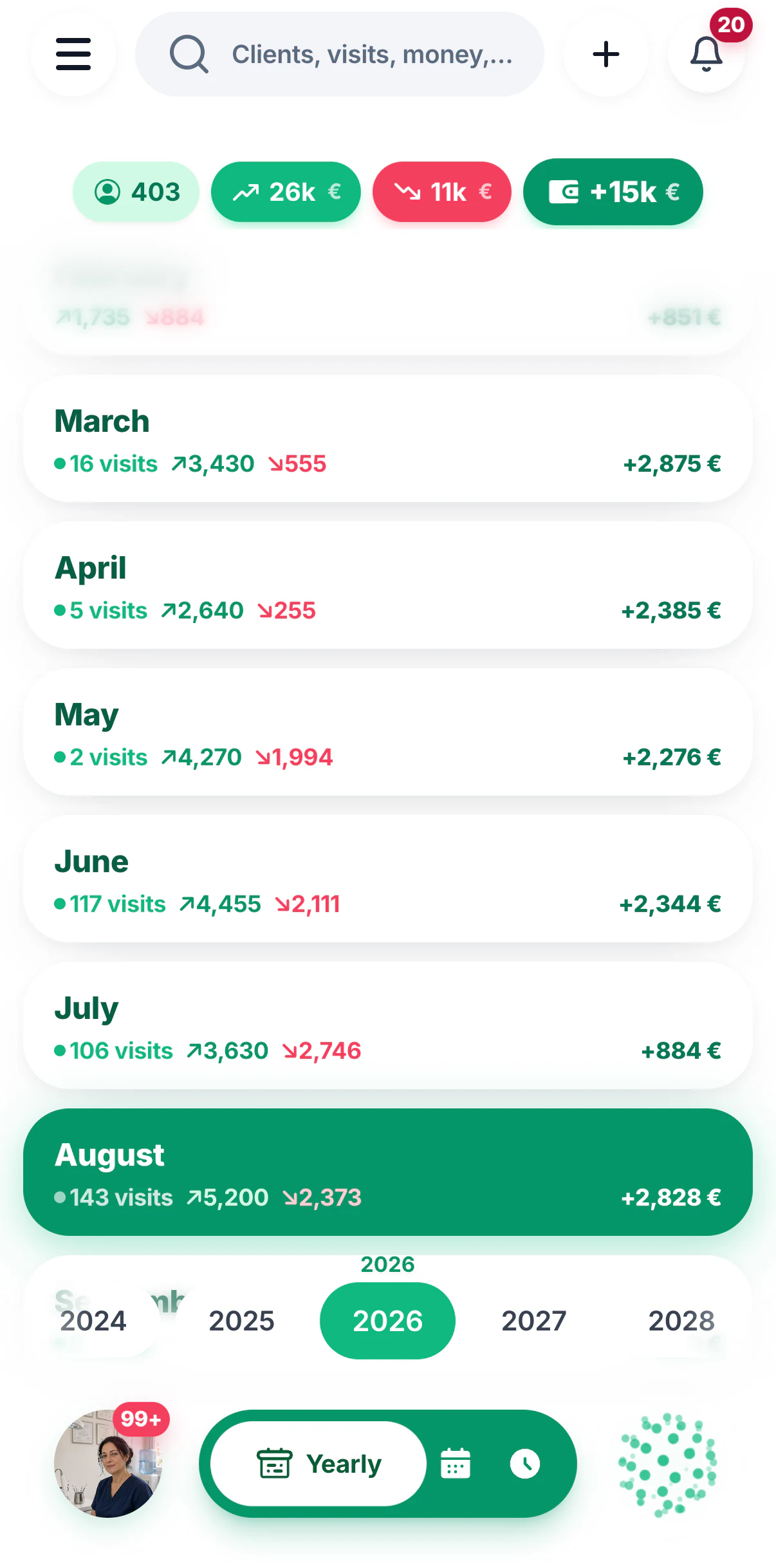
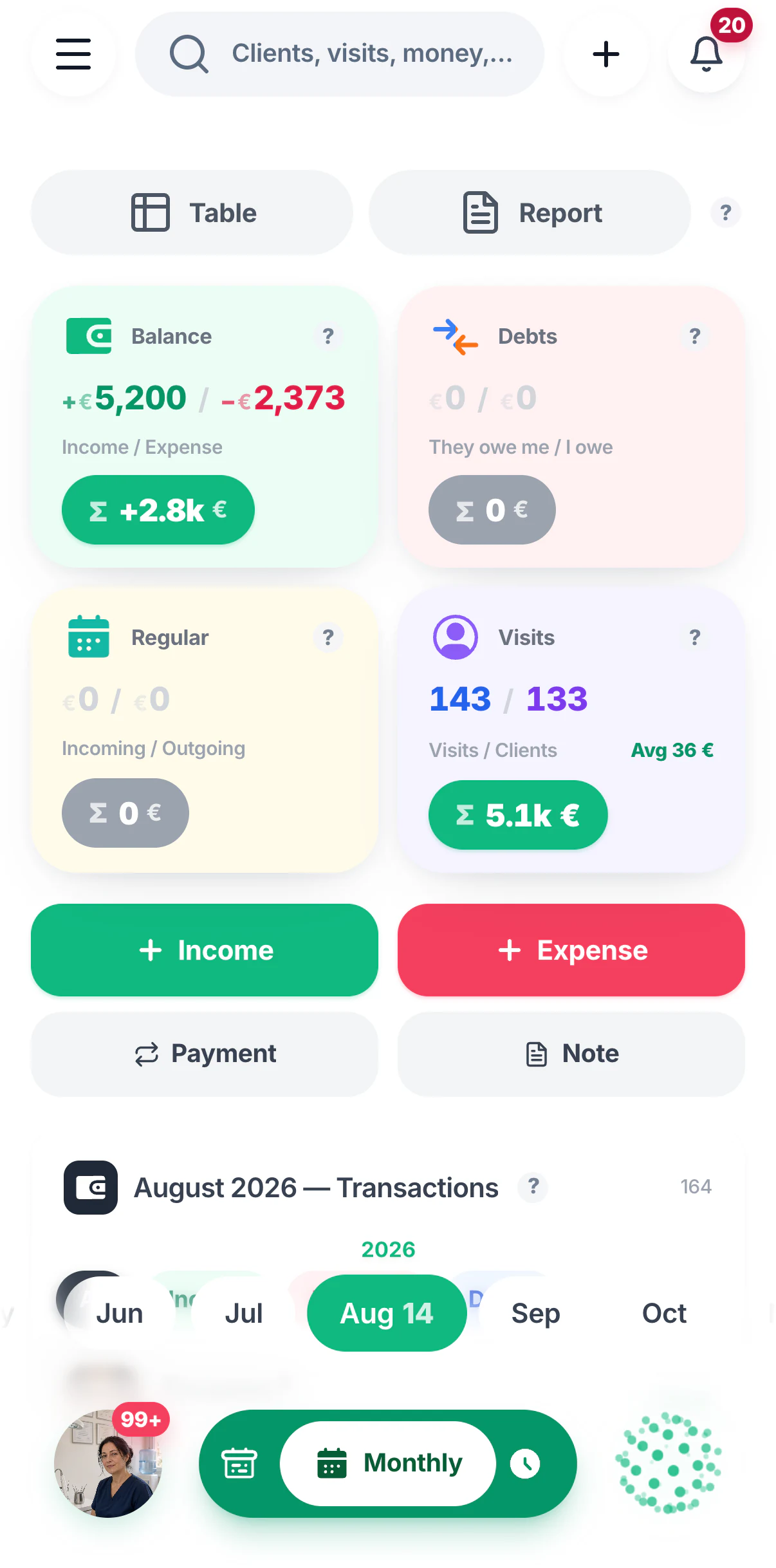
Takings, costs, profit, average ticket, who still owes you — computed from what's already in the app, in whatever currencies you actually work in.
Six charts — running balance, income against costs, turnover, visits and clients, everything at once, and where the money leaks.
37 currencies. The rate is locked the moment you save, so last year's numbers stay last year's numbers.
An accountant's export — income and expense registers, debts, category breakdown, VAT summary, your tax number and local tax regime.
Two-way Google Sheets sync for clients, visits, income, expenses and debts — nothing is ever deleted on the other side.
04 · Statistics
The numbers you never sat down to count
You don't fill anything in for these. Every figure below is computed from the bookings and money you've already recorded — on screen, in a PDF, or pushed to you before you thought to ask.
Revenue, visits and average ticket for the last 90 days, as three headline figures.
Top five services — what actually earns, not what you think earns.
A revenue forecast — where the month lands based on what's already booked.
Business insights — patterns found for you: your busiest hours, repeat versus one-off, seasonality, who's drifting away.
Open any card to see the actual fields, the voice phrase that creates it, and what the app does with it afterwards. Nothing here is a mock-up — this is what ships.
01 / 09
A client
A full card with photos, history and lifetime value
“Add a new client — Irina, and her number is…”
First & last namePhoneAddress on a mapBirthdayInstagram20+ fields total
What happens next
Lifetime value — total spend, visit count and outstanding debt are computed for you.
Auto-segments — VIP, birthdays this month, gone quiet, brand new, owes you money.
Duplicate guard — a similar name is caught before it becomes a second card.
A series in one breath — “every two weeks” creates up to 12 appointments at once.
The price is the income — a visit's price counts as revenue automatically; no double entry, and the app actively blocks it.
Corrections are edits — “no, make it five o'clock” updates the booking instead of creating a second one.
03 / 09
Income & expenses
29 ready categories, any currency, rate locked on save
“Write down two hundred on supplies”
AmountCategoryDate & timeClientLocation
What happens next
23 expense and 6 income categories ready out of the box — or invent your own with an icon, a colour and a photo.
Real multi-currency — 37 currencies on an iOS-style wheel. Say “euros” and it stays euros; the exchange rate is frozen at the moment you save, so history never rewrites itself.
Duplicate warning — record the same amount twice in a row and the app asks first.
04 / 09
A receipt or document
Photograph it — AI reads ~35 fields
“Snap a receipt” — camera or gallery, your choice
Paper receiptInvoicePrice tagBank screenshotPDFExcelGoogle Docs link
What happens next
It decides for itself whether the document is money in or money out, and picks a sensible category.
The expense is created with it — edit the receipt later and the linked expense follows.
Photos can attach to anything — a visit, a client, an expense, a debt, a payment or a note, not just receipts.
05 / 09
A reminder
By clock time — or by odometer reading
“Remind me tomorrow at nine to call Maria”
What to remind youDate & timeWarn me early (an hour, a day)RepeatOr: at 55,000 miles
What happens next
A push notification plus a visible card sitting inside that day.
Attach it to the thing it's about — a client, a visit, a debt, a note, an expense or a payment. It then lives inside that object's block in your day.
Already set? Kali tells you instead of quietly creating a second one.
06 / 09
A note
Pinned to any of seven kinds of object
“Make a note — Maria is allergic to gel”
A clientA visitA debtA datePhotosTagsPin to top
What happens next
It shows up where you'll need it — inside the client's card and inside that day's block, not in a separate notes graveyard.
Save a web answer verbatim — ask Kali to look something up, then say “save that as a note” and the full text with its sources is stored, not a paraphrase.
A one-off payment refuses to be forgotten — it reappears in every single day until you mark it paid.
Marking it paid creates the real transaction and rolls the date forward to the next period.
Optional autopilot — let it post the transaction itself on the due date.
08 / 09
A debt
Both directions, with a due date and time
“Pete owes me fifty for the job, due Friday”
They owe me / I owe themAmount & currencyClientDue date & timePhoto
What happens next
Settling it books the money — mark it paid and the income or expense is created, dated whenever you say it was actually paid.
Counted once, never twice — a settled debt and its transaction are deliberately de-duplicated so the same money can't inflate your totals.
Ask out loud — “who owes me right now?” answers from the database, not from guesswork.
09 / 09
A service or product
A price list — where the price is optional
“Add extensions to the price list at eight hundred”
NamePriceDuration in minutesService or product
What happens next
No fixed price? Fine. “Website build” can live in your list without a number, and each deal carries its own price.
Feeds the booking page — whatever is in your list is what clients can book themselves.
Your trade's vocabulary — clinics get “patient” and “appointment”, tutors get “student” and “lesson”, workshops get “order”. Kali says those words too, in all 43 languages.
Unattended
Seventeen things that happen without you
These run on a schedule on the server — they work whether the app is open, closed, or your phone is in a drawer.
Visit reminders to clients
In the client's own language, at the right hour — plus a short one just before.
Birthday wishes
Sent on the day, without you keeping a list.
Win back the quiet ones
Clients who've stopped coming get a nudge before you've noticed they're gone.
Ask for a review
A message after the visit, while they still remember it fondly.
Your morning digest
Today's bookings, money and what needs deciding.
Revenue forecast
Where the month is heading, based on what's booked.
Business insights
Patterns worth acting on, found for you rather than by you.
Recurring payments post themselves
On the due date, if you've asked them to.
Calendar & Sheets stay in step
Google Calendar and Google Sheets sync in the background, both ways.
Departure & check-in nudges
For trucking: time to roll, and a check-in while you're out.
Service due by mileage
The odometer, not the calendar, decides when to warn you.
New booking alerts
Someone books through your link — you know immediately.
Self-booking
Let them book themselves
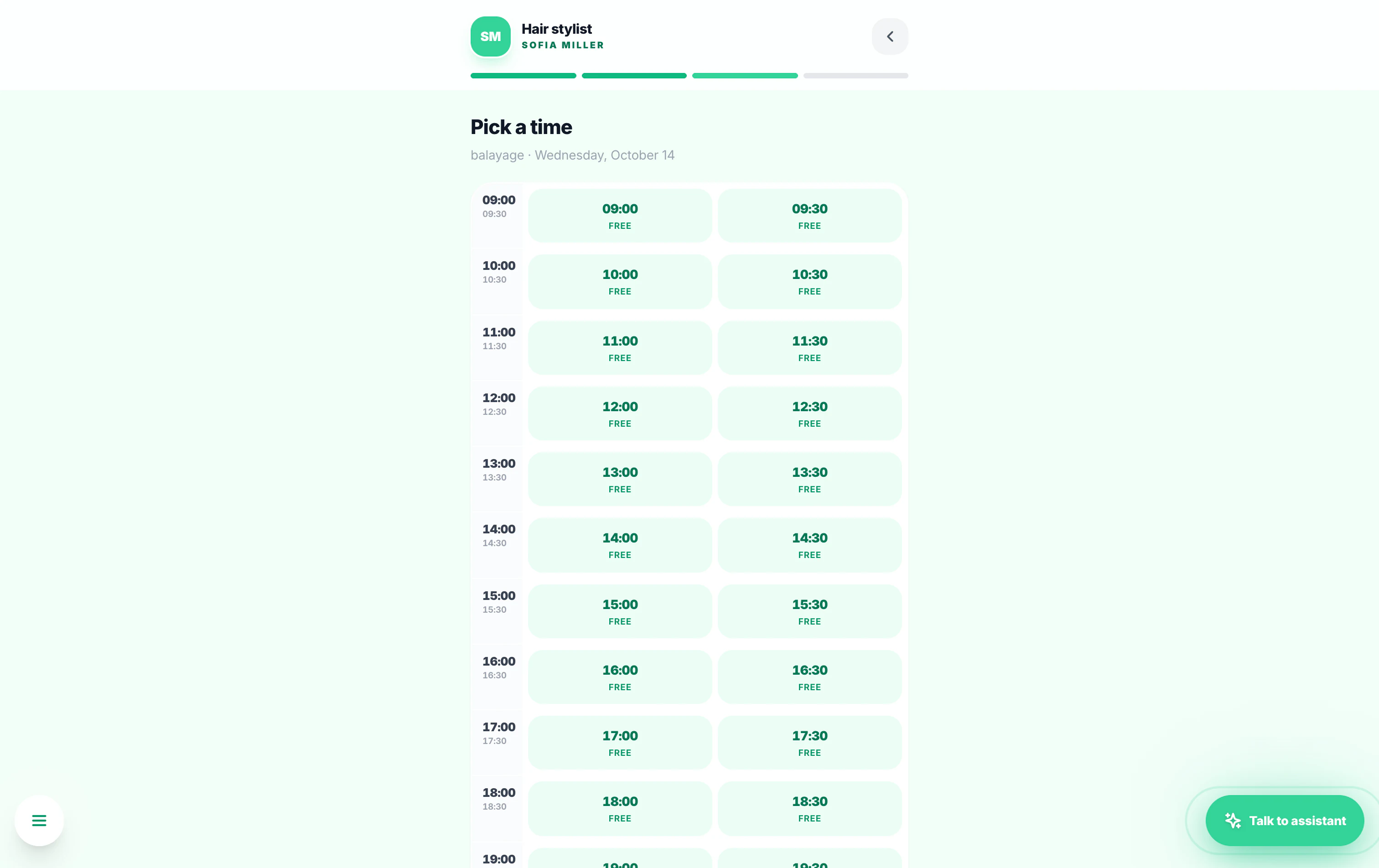
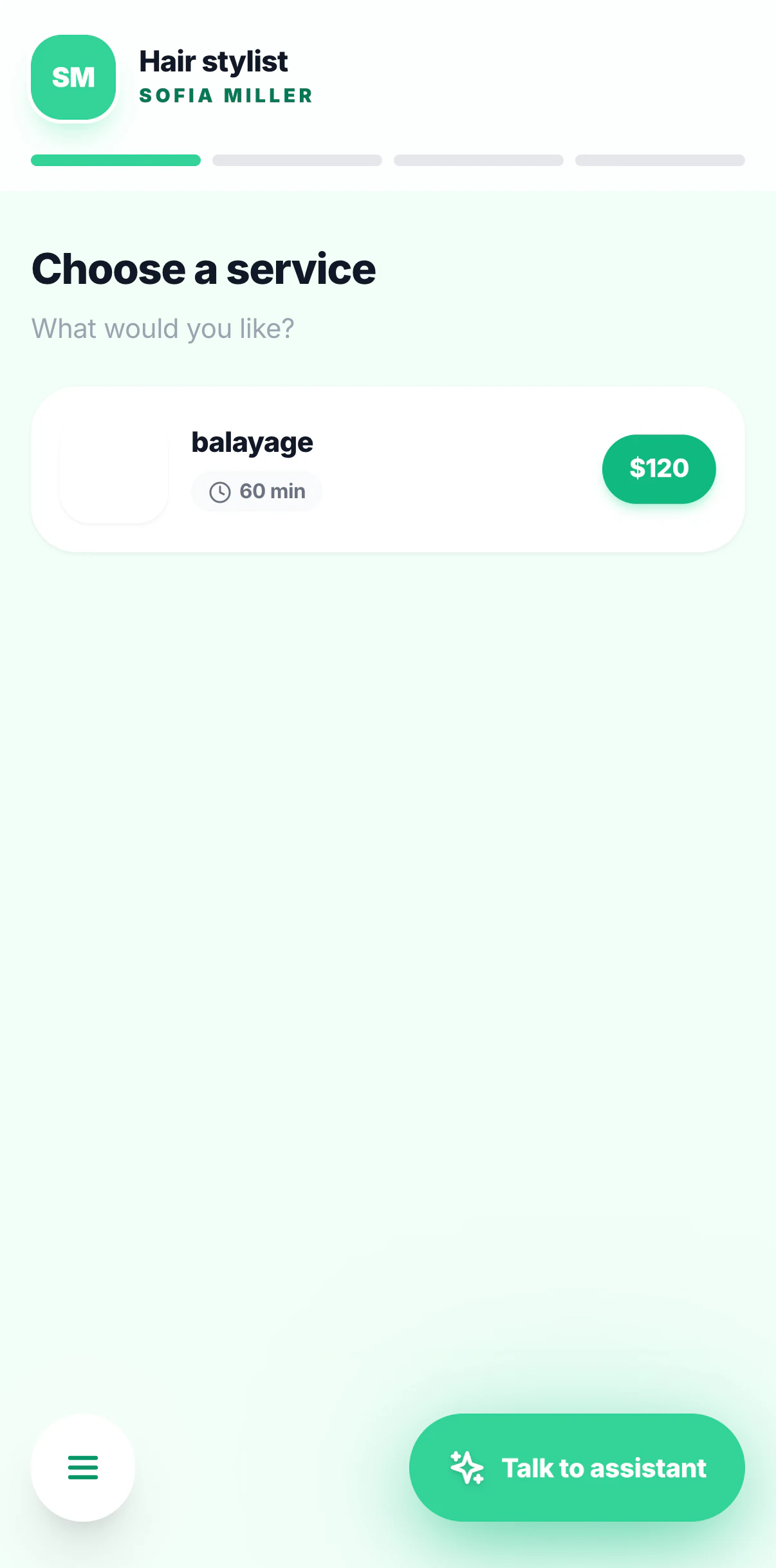
Share one link. Your client picks a service, a day and a free slot, leaves their name and number, and it lands in your calendar. No app for them to install, no account to create.
In their language
The page speaks all 43 languages and picks theirs automatically.
Your shopfront
Your photo, your business name, a gallery of your work and your real price list.
Or embed it
Drop a booking card straight onto your own website with one line of code.
Owner-operators
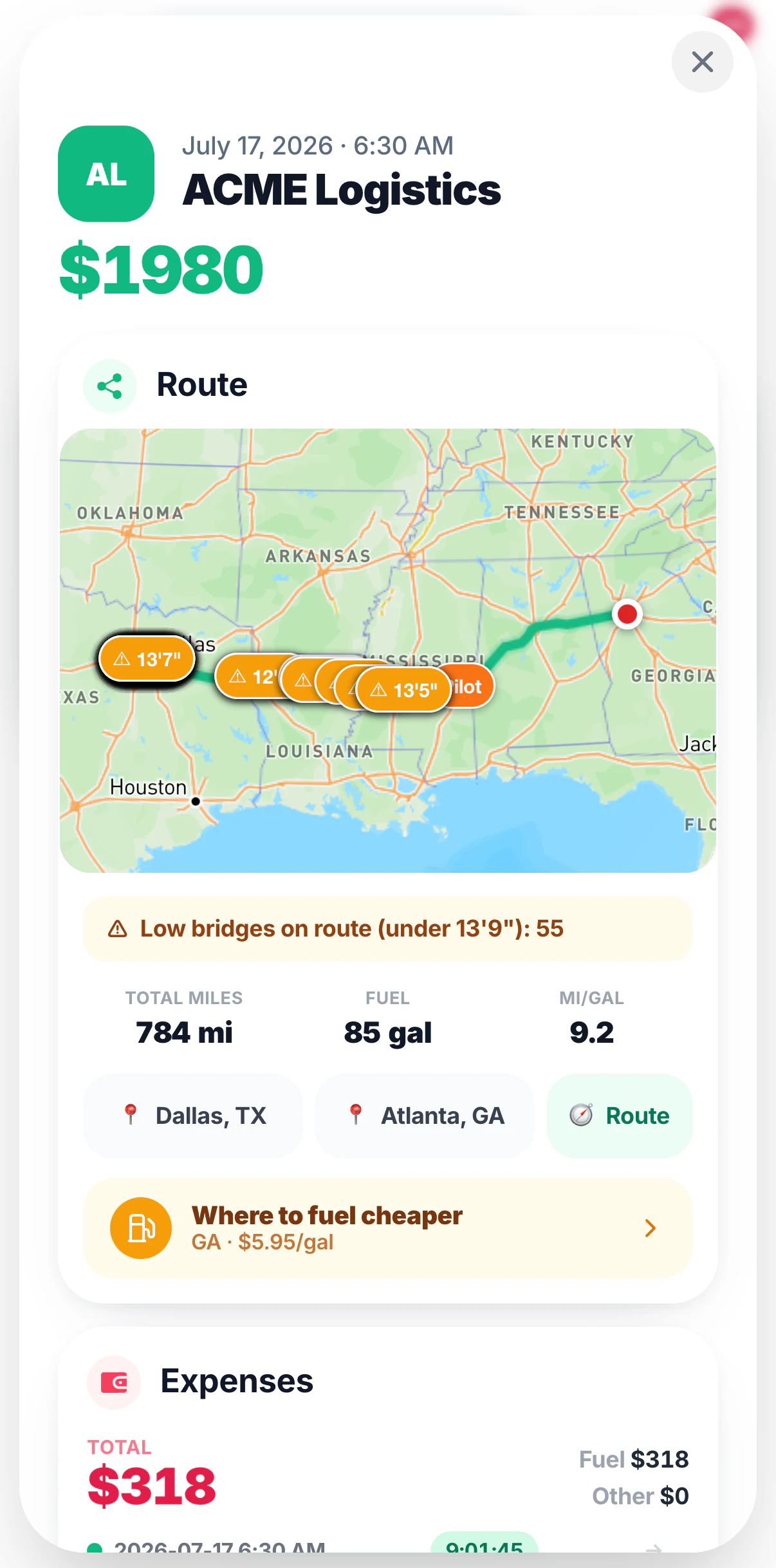
Driving a truck? The whole app changes
Pick trucking at signup and Kali stops being a salon receptionist and becomes your dispatcher. New vocabulary, 21 extra commands, and the numbers that actually decide whether a load was worth taking.
“Load from Chicago to Dallas, 980 miles, twenty-four hundred, rolling out tomorrow at six”
DetentionLayoverTONULiftgateLumperTollsScales
Live profit — “what do I clear on this one?” answers with rate plus FSC plus accessorials minus real costs. Never “I can't calculate that”.
One sentence, three records — an expense, a fuel log and an IFTA line, all at once.
IFTA by jurisdiction — miles and gallons per state or province, for the quarter, on request.
An invoice to the broker as a PDF, straight from the load, with your MC, DOT and EIN on it.
Built for who
Made for masters,small teams and studios.
Anyone who books, treats, teaches, or works with people one-to-one. If you have clients with names, you have a business worth running well.
Official AI partner
Trusted by the schoolsthat train the pros.
Ukraine's leading manicure & pedicure academy. Every graduate starts out with their own Kali AI assistant.
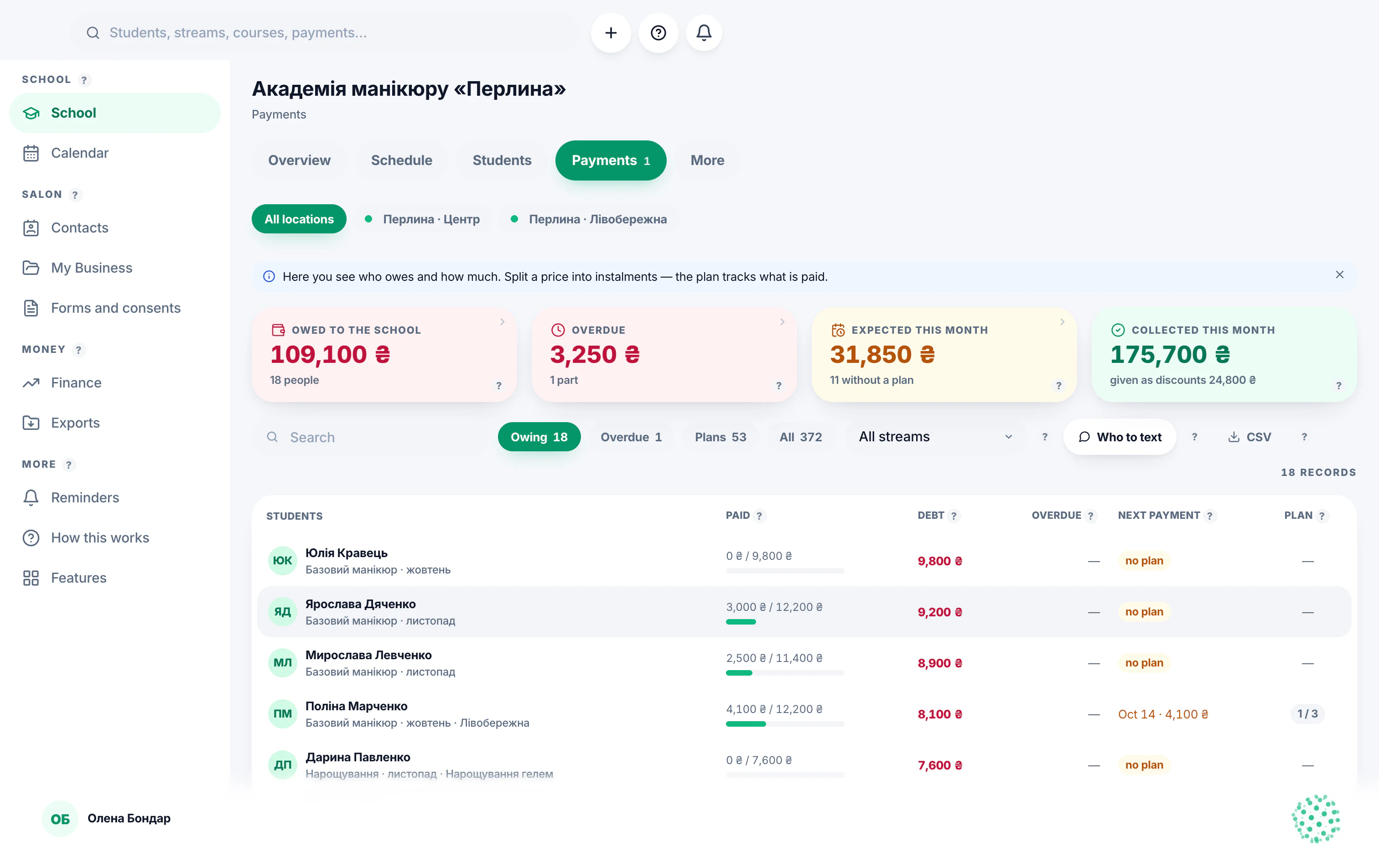
Tuition coming in, expenses going out, debts with reminders, instalments, teacher pay and a report for any period — the whole money side of a school in one place. And you can simply ask Kali.
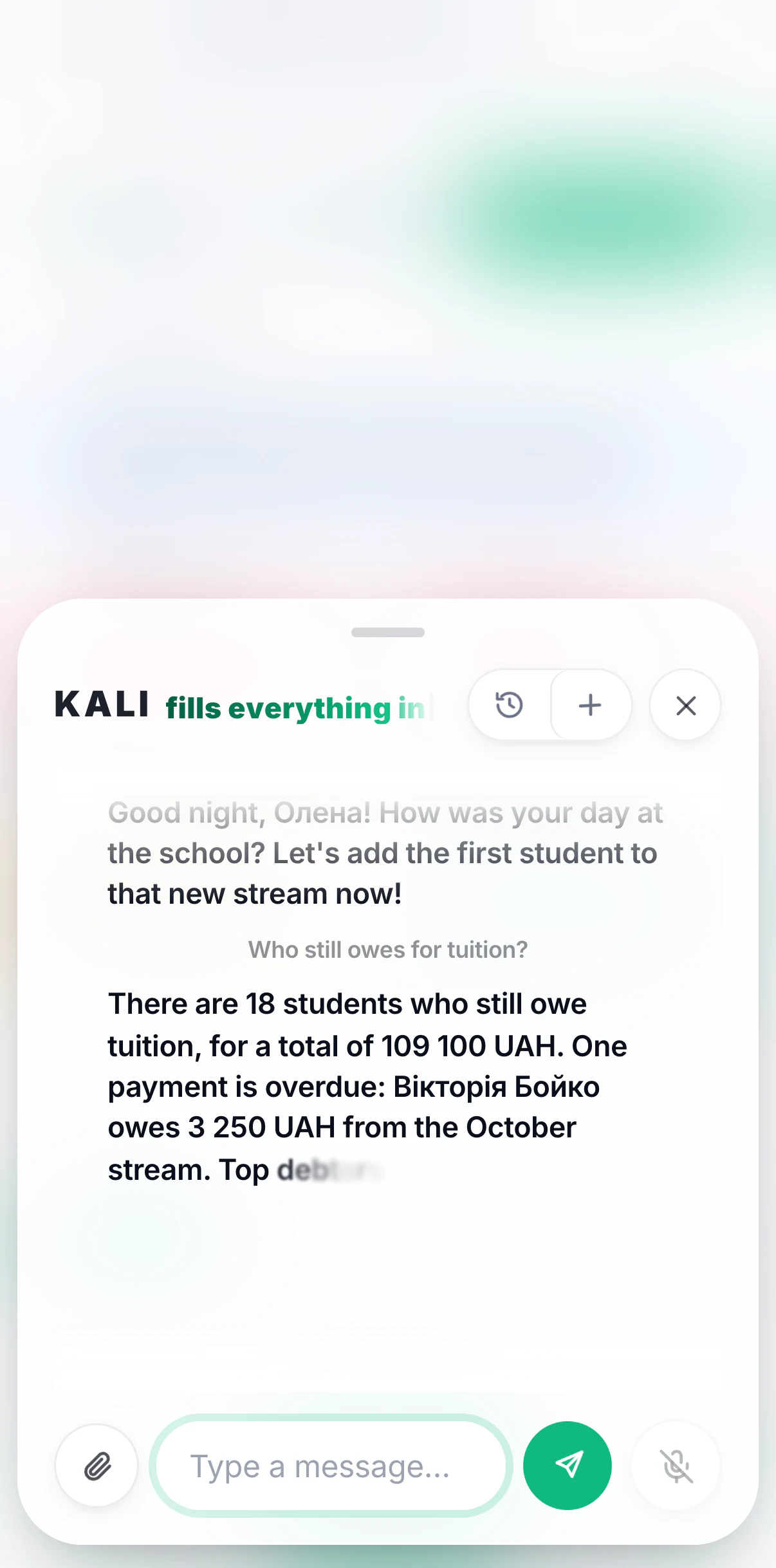
“Who still owes for tuition?”
Kali answers from the database, by voice — and opens the screen.
Payments on the Mac: who owes, overdue, instalment plansOn the phone: Kali answers a money question
IncomeEvery tuition payment lands on the student, the course and the month. The till shows what actually came in — tuition and everything else.
ExpensesRent, materials, advertising, teacher payouts, refunds — written down next to the income, so the month shows profit, not just takings.
Debts and remindersWho owes, how much and since when. Overdue payments are highlighted and go into the school's morning reminder by themselves.
InstalmentsSplit tuition into parts with their own dates. Each part is tracked separately: paid, due next, overdue.
Teacher payA pay rule per teacher — per hour, per lesson, a fixed salary or a share of tuition. The amount owed is computed from lessons actually held, and a payout lands in the month it is for.
Reports for any periodThis month, last month, three months, a year or all time: income, expenses, profit, debts and payroll — and every figure has an «i» that explains how it was counted.
For schools · Access
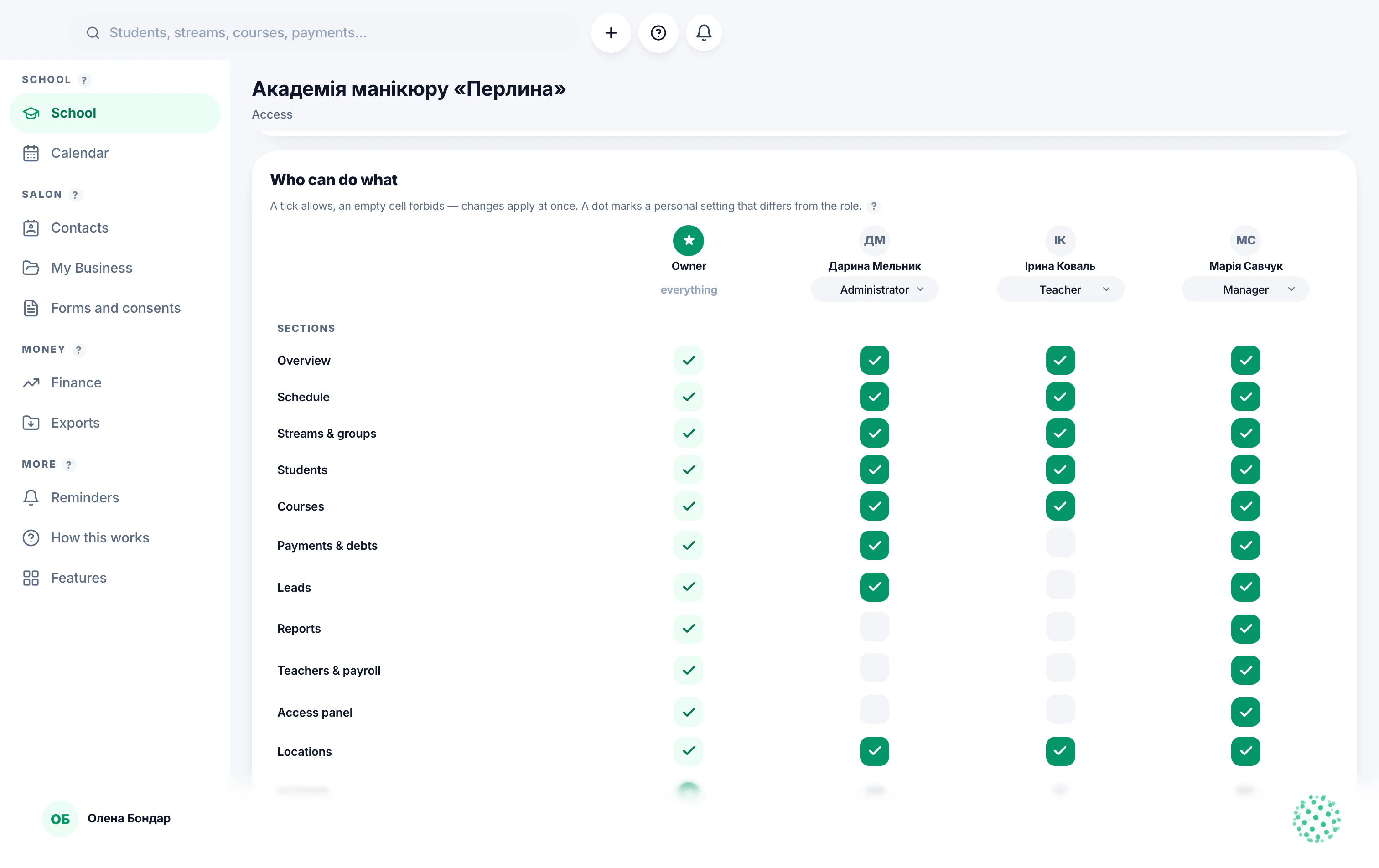
Who can do what — your call, per person.
Every manager and teacher gets a role, and where you want it, their own exceptions. One table of ticks shows the whole team at a glance, and a change applies at once — in the app, in Kali and in the database.
The «Who can do what» card: people across, sections and actions down
A role per person
Manager, teacher, administrator or view-only. The role sets the defaults: which sections they see and what they are allowed to do.
Personal exceptions, marked with a dot
Let one teacher see payments and keep the others out. A cell that differs from the role carries a dot, so you always know who has what — and why.
“As the role” puts it back
Changed your mind? “As the role” returns the person to the role's defaults in one go. Nothing to remember, nothing to untangle.
In the appSections you switched off are simply not there for that person.
In KaliA teacher who may not see money won't get it by asking out loud either.
In the databaseThe rule is checked on the server, not just hidden on the screen.
43 languages
Speak yours. They'll read theirs.
The interface, the voice assistant, your clients' booking page and the messages they receive are each localised independently — so you can work in one language while your client is served in another.
Stop juggling tools
Replacefive toolswith one app.
Notebook + Excel + WhatsApp chats + a paper diary + a separate finance app — that's where most masters live. Custom AI replaces all of it.
Excel for clients
Client cards with photos, full visit history, debts and notes — searchable and AI-aware.
A
Anna12 visits · €420 lifetime
Regular client
Paper diary or 3 calendar apps
One calendar: day, week, month, year. Drag-and-drop, recurring slots, public booking link.
11121314151617
Finance in your head
Real income, expenses, recurring payments and debts. Monthly totals that just appear.
Manual messaging clients
Share /book — your clients pick a free slot themselves on a beautiful page in their language.
app.ccustom.ai/book
Typing while doing nails
Voice AI: "Add Anna for 3 PM tomorrow" — done. Hands-free booking, hands-free finance.
"Mark Mark's payment as paid."
The real math
One employee.Or Kali.
Same job — clients booked, money tracked, nothing forgotten. Here's what each one actually costs you.
Human employee
8 hours a day, 5 days a week
Sick days, training, turnover — you pay either way
Can quit tomorrow — with your clients' phone numbers
€35 000/ year, on average
Kali, your AI
24 hours a day, every single day
Never sick, never late, never quits
Talks to every client in their own language — all 43
Want a whole month free? Write to us personally — we'll send you a promo code:contact@ccustom.ai
Frequently asked
Quick answers.
Is it really free?Do I need to install anything?How does the voice AI work?What about my data?Can my clients book themselves?Which industries is it for?Does it work offline?Can I migrate from another app?
Open Custom AInow.
Free to start. Your data — yours. Your AI — yours.
 Custom AI